Six alert families watch every tracked peg through the night — from depeg events to issuer freezes — and land in your Telegram chat only when something changes. Start with one preset; tune later.
Six alert families, each firing on its own evidence — and every message below is the exact text the bot sends. No mock-ups.
DEWS Threat Level
dews
DEWS — the Depeg Early Warning System — scores stress before a peg breaks. Fires when a coin crosses into a worse band, with the two highest-stress signals named.
PharosWatchBot
DEWS
🟡 USDT — WATCH → ALERT (score: 42)
Top signals: pool_balance_drift (61%), supply_velocity (48%)
View on Pharos: pharos.watch/stablecoin/usdt-tether
Depeg Events
depeg
Fires when a peg moves past your severity step (100, 250, or 500 basis points), again on each worsening milestone, and when the peg recovers.
PharosWatchBot
Depeg Detected
▼ USDC — below peg by 1.2% (120 bps)
Price: $0.9880 (peg: $1.00)
View on Pharos: pharos.watch/stablecoin/usdc-circle
Safety Grade Changes
safety
Fires on live safety-grade shifts and names the driver on the Reason line, so you know why, not just what. Methodology re-scores never page you.
PharosWatchBot
Safety Grade Change
USDR — B → F
Score: 70 → 39
Reason: Active depeg peak 7546 bps capped the pre-variant Safety Score at F (39). Now: Safety F 39 · Liquidity 57, DEX TVL $1.2M · Supply $13.1M
View on Pharos: pharos.watch/stablecoin/usdr-tangible
Launch Promotions
launch
Fires when a tracked pre-launch stablecoin goes live. Subscribe by ticker — presets don't cover launches.
PharosWatchBot
Stablecoin Launched
✦ USDPT — US Dollar Payment Token has launched and is now tracked by Pharos
View on Pharos: pharos.watch/stablecoin/usdpt-western-union
Reserve Drift
reserve
Fires when a live-tracked coin's backing mix newly diverges from its curated profile. Entering drift only, and only on coins with live reserve tracking.
PharosWatchBot
Reserve Drift
USDC — Circle USD Coin live reserve mix has drifted from its curated profile
View on Pharos: pharos.watch/stablecoin/usdc-circle
Freeze and Blacklist Events
freeze
Fires when the verified on-chain tape records an issuer blacklist, release, or destroy event. Opt-in, per coin.
PharosWatchBot
Issuer Freeze Event
USDC — address frozen on Ethereum
Amount at event: $1,000,000
Source: Pharos FreezeWatch: pharos.watch/freezewatch/
View on Pharos: pharos.watch/stablecoin/usdc-circle
Start in two minutes
One useful default now; tune only when you need to.
01
Open @PharosWatchBot
Telegram opens the private setup flow. A group works too, but group mutations require an admin.
02
Approve the low-noise default
DEWS and depeg alerts for the current top 25 USD stablecoins. Preset membership updates as the market changes.
03
Check and adjust
/list audits effective follows, /health diagnoses delivery, /set or the Mini App tunes thresholds.
Live, aggregate counts from the bot itself, refreshed every five minutes. Adoption telemetry only — nothing operational, nothing individual.
The same alert state, without slash commands
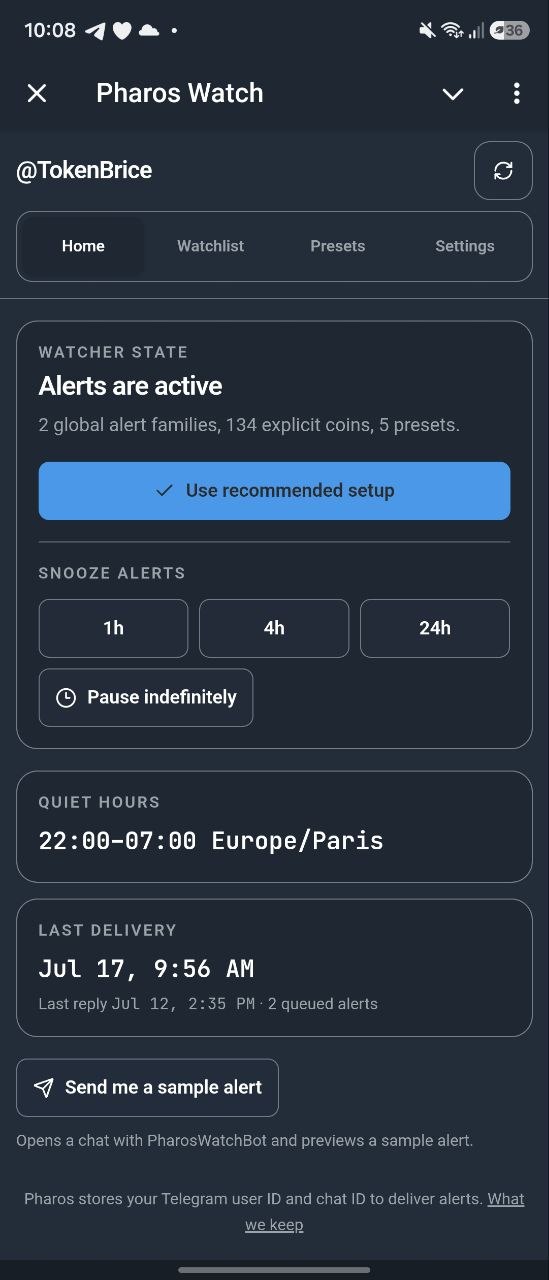
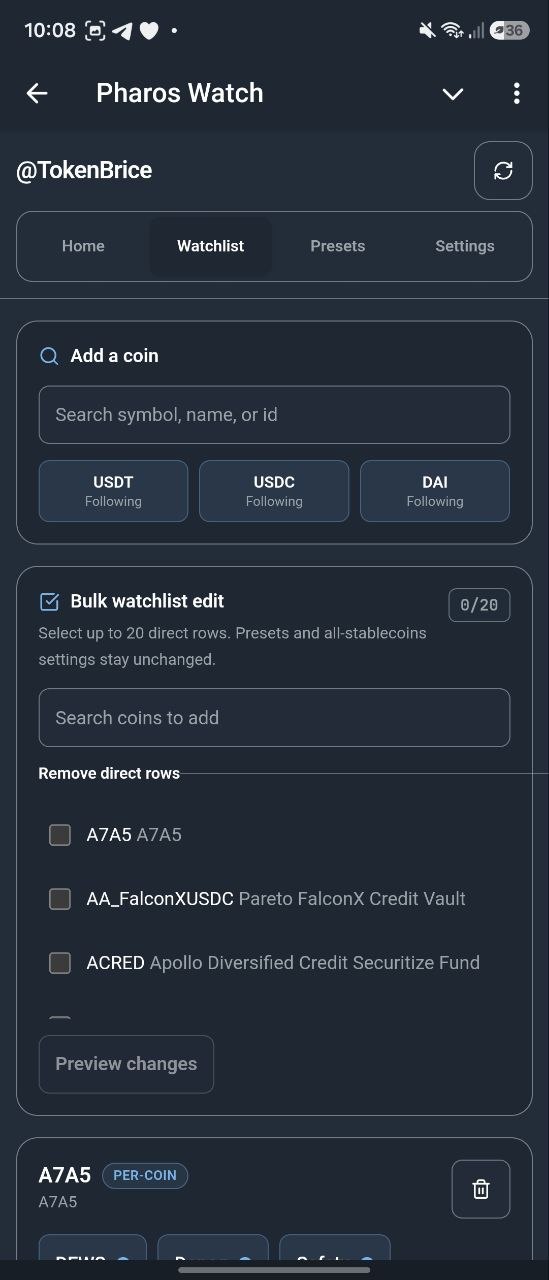
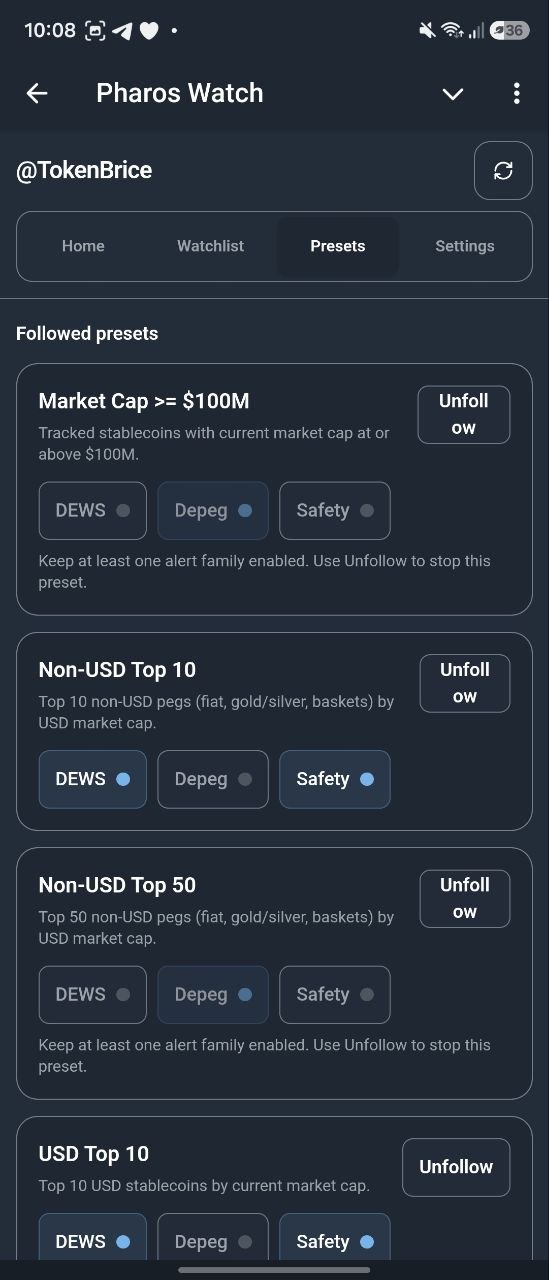
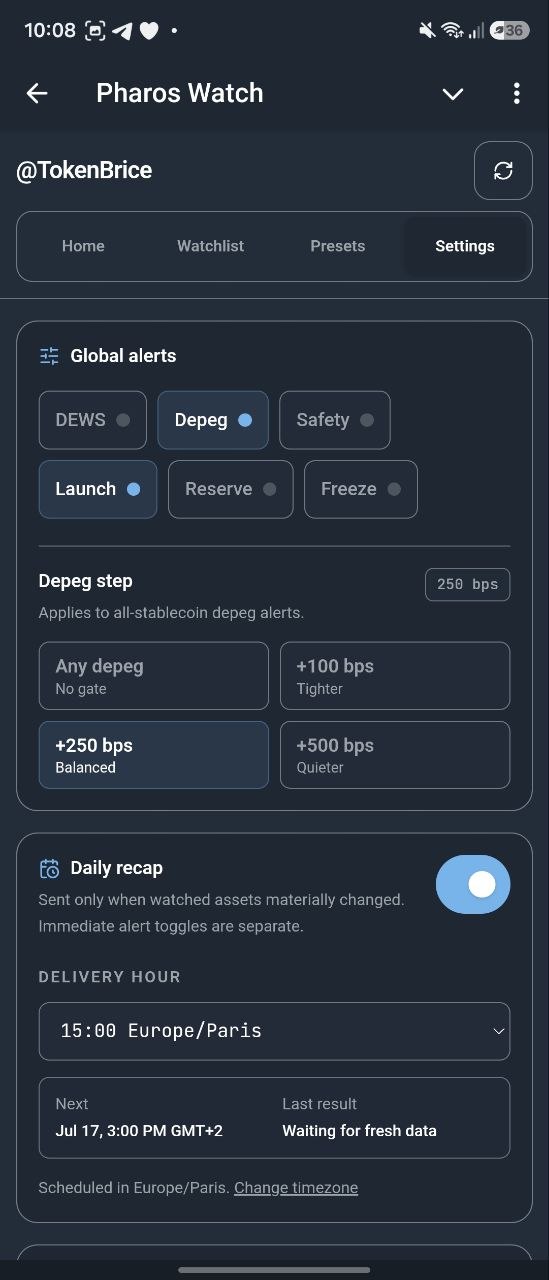
The Mini App is the same alert state without slash commands — watchlist, presets, quiet hours, snooze, delivery health. Deep reads like /why, /brief, and /top stay in chat.
01Watchlist
Followed coins, alert toggles, live risk context.
02Daily recap
One private summary when watched assets materially change.
03Global alerts
DEWS, depeg, safety, launch, reserve, and freeze in one panel.
04Per-coin tuning
DEWS bands, depeg steps, safety modes, reserve, and freeze switches.
Set /timezone once, flip /recap on, and the bot sends one private summary of your watchlist’s material changes each local morning — only when something actually changed. No material change, no message.
Active watchers
—
Tracked stablecoins
488
Alert families
6
Bot commands
30
Price
Free
Start getting alerts.
Open the bot, approve one preset, and tonight’s signals have somewhere to land.
Methodology for DEWS, safety-grade, and depeg scoring lives on the methodology page
Commands, limits, and answers
Everything, in writing: every command, every bound, every privacy term.
30 commands in 5 groups
Subscribe
/subscribe <types> <targets>
Enable alert types for one or more coins, coin-ids, or presets. <types> is comma-separated.Example: /subscribe dews,depeg usd-top25
/subscribe <types> all
Enable alert types across every tracked coin. safety all sends downgrades only and applies a 3-point filter when scored.Example: /subscribe depeg,safety all
/subscribe <targets> depeg-step <value>
Enable depeg alerts, gate them by severity, and re-alert on each worsening milestone. <value> must be 100, 250, or 500 bps.Example: /subscribe usd-top50 depeg-step 250
/presets
Browse preset watchlists (usd-top25, non-usd-top25, mcap-ge-1b, ...). Subscribing to a preset expands to its current member coins.Example: /presets
Unsubscribe
/unsubscribe <targets>
Remove coins by ticker, coin-id, or preset. Preset removal expands to its current member coins.Example: /unsubscribe usd-top25
/unsubscribe all
Clear every per-coin, preset, and all-stablecoin subscription. Operational chat metadata can remain until inactive cleanup.
Tune
/set <ticker> <setting> <value>
Tune one coin. <setting> is dews <band> (WARNING/ALERT/DANGER/off), depeg on|off, depeg-step <bps> (100/250/500), safety <mode> (downgrade-only/upgrade-only/all/off), launch on|off, reserve on|off, or freeze on|off.Example: /set USDT dews WARNING
/set all <setting> <value>
Global toggle for dews, depeg, safety, launch, reserve, or freeze. safety globally supports all/off only (downgrades, 3-point filter when scored). depeg-step <bps> sets the global severity gate and worsening step.Example: /set all depeg-step 250
/mute <start>-<end>
Set quiet hours (integer hours, 0–23) interpreted in the chat's /timezone (UTC if none is set). Notifications are silenced; messages still deliver. Use alert toggles or unsubscribes for all-day silence.Example: /mute 22-07
/timezone <IANA-zone>
Set the chat's IANA timezone used to resolve /mute quiet hours locally (e.g. Europe/Paris, America/New_York). Sending /timezone with no argument shows the current zone and an inline keyboard of common zones.Example: /timezone Europe/Paris
/recap [on|off]
Show, enable, or disable the private daily watchlist recap. Enabling requires a confirmed /timezone. A recap sends at most once per local day and only when watched assets materially changed.Example: /recap on
/recap time <hour>
Set the recap delivery hour from 0 to 23 in your confirmed IANA timezone. Personalized recaps are private-chat only.Example: /recap time 9
/settings
Open an inline-keyboard panel for chat-level settings (quiet hours, snooze clear, global DEWS/depeg/safety/launch/reserve/freeze toggles). Add a ticker (e.g. /settings USDC) to open the per-coin panel with DEWS floor, depeg step, safety mode, launch, reserve, and freeze toggles.Example: /settings USDC
/pause [off|1h|4h|24h]
Pause all alerts indefinitely, resume with off, or apply a timed 1h, 4h, or 24h snooze.Example: /pause 4h
/unmutehours
Disable quiet hours.
/unsnooze
Clear active alert snooze immediately.
Query
/status <ticker>
Snapshot for one coin: price with age, supply, DEWS band, safety grade, active depeg, liquidity score with TVL, and 30d yield.Example: /status USDC
/brief
Latest market brief: peg deviations, supply shifts, liquidity changes, and what changed overnight. /market is a deprecated compatibility alias.Example: /brief
/sample
Private-chat-only preview of a synthetic USDC DEWS alert so you can inspect the alert format before subscribing.Example: /sample
/top <view>
Rank current views. <view> is one of: depeg, dews, yield, liquidity, chains, safety.Example: /top depeg
/why <ticker>
Plain-language breakdown of one coin's Safety Score: top weak dimensions and contributing report-card factors.Example: /why USDC
/coverage <ticker>
List which Pharos modules cover one coin: price, DEWS, safety, liquidity, yield, mint/burn, reserves.Example: /coverage USDC
Meta
/start
Open the guided setup flow or process a supported Telegram deep-link payload.Example: /start
/list
Audit your state: global alerts, dynamic preset follows, per-coin subscriptions with settings, quiet hours, and active snooze.
/health
Self-diagnostic for this chat: last successful delivery, queued alerts, quiet hours, snooze, and recent failure class.
/cancel
Cancel a pending ticker-selection prompt (when a symbol matches multiple coins).
/help
Show command reference.
/forget
Private-chat-only, two-step deletion of subscriber data, alert settings, quiet hours, snooze state, live delivery diagnostics, and chat-linked delivery audit rows.
/export
Create a portable watchlist token containing explicit follows, alert types, and followed presets. Quiet hours and snooze are excluded.Example: /export
/import <token>
Validate a token from /export and stage its watchlist behind a confirmation. Group imports require an admin.Example: /import eyJ2IjoxLC4uLn0
Local delivery hour from 0 to 23 in the chat's confirmed /timezone
<start>-<end>
Integer hours, 0–23 (interpreted in the chat's /timezone; UTC by default)
all
Reserved target meaning every tracked stablecoin
Command tips
Tickers are case-insensitive. Use the exact Pharos coin-id (e.g. usdc-circle) when a symbol is ambiguous.
all is a reserved target for every tracked stablecoin. Launch and reserve alerts do not use preset watchlists; choose explicit tickers, coin-ids, or all.
In Telegram groups, address commands to the bot: /subscribe@PharosWatchBot dews usd-top25. Pending ticker selections only complete for the user who started them.
Typing / inside Telegram opens an inline command picker once the bot is registered.
Other starter setups
Group setup
/subscribe@PharosWatchBot dews usd-top25
Address commands to the bot so a shared Telegram group runs one watch desk without colliding with other bots.
What Pharos promises — and what it does not
Alerts are a bounded notification service, not a guaranteed emergency pager. Each message links back to Pharos so you can inspect the underlying signal.
Source cadence
The dispatcher runs every 5 minutes. Safety follows the live report-card publish path; reserve drift follows the four-hour live-reserve producer and only fires for supported live-reserve coins.
Bounded delivery
Eligible alerts can send immediately or enter a retry queue. Risk alerts expire after 2 hours; launch alerts after 90 minutes and admin broadcasts after 45 minutes. Terminal and ambiguous outcomes stay visible to operators rather than being silently replayed.
Privacy
Pharos stores your chat ID, optional username, follows, alert settings, quiet hours, snooze state, and short-lived command or queue metadata. Use /forget in a private chat for immediate deletion; inactive unsubscribed chats are pruned after 180 days.
Adoption metrics above are aggregate counts; small daily changes are hidden to avoid identifying individual chats. Read the full privacy policy.
Frequently asked questions
Is PharosWatchBot free?
Yes. All alert families, presets, group commands, and tuning controls are free. Pharos is donor-funded; see the funding page if you want to support it.
Where do alerts land — DM or group?
Subscriptions are tied to the chat where you ran the command. DM the bot for personal alerts, or add @PharosWatchBot to a Telegram group for a shared watch desk.
What alerts does Pharos send on Telegram?
DEWS threat-level band crossings, depeg detections and worsening milestones, safety-grade changes with reason lines, pre-launch assets going live, entering live reserve-mix drift, and verified issuer freeze events.
Can I get alerts for all tracked stablecoins at once?
Yes. Send /subscribe <type> all, for example /subscribe depeg all, to subscribe across every tracked stablecoin. The safety lane is intentionally narrower globally: it sends downgrades only and applies a 3-point filter when scores are present.
How do I silence Telegram notifications during certain hours?
Use /mute <start>-<end> with integer hours (0–23). For example, /mute 22-07 silences alerts between 10pm and 7am. Quiet hours are interpreted in the chat's /timezone: set it once with /timezone Europe/Paris (or any IANA zone) and /mute will use it; without /timezone, hours fall back to UTC. Use /unmutehours to disable quiet hours. Use alert toggles or unsubscribes for all-day silence.
Is there a Mini App or do I have to type commands?
Both work. Every alert family, preset, threshold, and daily recap setting is reachable through commands. There's also a Mini App you can open from the bot's menu button or via https://t.me/PharosWatchBot?startapp=home. It gives you a visual surface for the watchlist, settings, recap, snooze, and presets without typing slash commands. The Mini App and the bot share the same subscription state, so you can switch between them freely.
How does the daily watchlist recap work?
The personalized recap is an optional private-chat summary of material changes in your own watchlist, separate from the market-wide Daily Digest channel. Set an IANA timezone with /timezone, then use /recap on and optionally /recap time <hour>. Pharos sends at most one recap per local day and sends nothing when your watched assets had no material changes. The same controls are available in the Mini App settings.
What are preset watchlists?
Presets are curated coin lists like usd-top25, non-usd-top25, or mcap-ge-1b (compact and dashed spellings both work). Subscribing to a preset expands to its current member coins. Send /presets in Telegram to browse them.
Can I use the bot in a Telegram group?
Yes. Add @PharosWatchBot to the group and use addressed commands such as /subscribe@PharosWatchBot dews usd-top25. Subscriptions apply to that chat, and pending ticker selections can only be completed by the user who started them.
How do I unsubscribe?
Send /unsubscribe <targets> to remove specific coin subscriptions, or /unsubscribe all to clear every subscription and disable all alert flags. This stops alerts but does not immediately delete operational chat metadata; use /forget in a private chat for immediate subscriber-data deletion.
What does Pharos store for Telegram privacy?
Pharos stores chat-level alert settings, quiet hours, snooze state, and short-lived command or delivery metadata. /forget starts a private two-step deletion flow for subscriber data and live diagnostics. Inactive unsubscribed chats are pruned after 180 days, and public pulse metrics hide low-cardinality deltas while keeping the exact active watcher total visible.


 PharosWatchBot